


Learn JavaScript Tutorial
Our JavaScript Tutorial is designed for beginners and professionals both. JavaScript is used to create client-side dynamic pages.
JavaScript is an object-based scripting language which is lightweight and cross-platform.
JavaScript is not a compiled language, but it is a translated language. The JavaScript Translator (embedded in the browser) is responsible for translating the JavaScript code for the web browser.
What is JavaScript
JavaScript (js) is a light-weight object-oriented programming language which is used by several websites for scripting the webpages. It is an interpreted, full-fledged programming language that enables dynamic interactivity on websites when applied to an HTML document. It was introduced in the year 1995 for adding programs to the webpages in the Netscape Navigator browser. Since then, it has been adopted by all other graphical web browsers. With JavaScript, users can build modern web applications to interact directly without reloading the page every time. The traditional website uses js to provide several forms of interactivity and simplicity.
Although, JavaScript has no connectivity with Java programming language. The name was suggested and provided in the times when Java was gaining popularity in the market. In addition to web browsers, databases such as CouchDB and MongoDB uses JavaScript as their scripting and query language.
Features of JavaScript
There are following features of JavaScript:
1. All popular web browsers support JavaScript as they provide built-in execution environments.
2. JavaScript follows the syntax and structure of the C programming language. Thus, it is a structured programming language.
3. JavaScript is a weakly typed language, where certain types are implicitly cast (depending on the operation).
4. JavaScript is an object-oriented programming language that uses prototypes rather than using classes for inheritance.
5. It is a light-weighted and interpreted language.
6. It is a case-sensitive language.
7. JavaScript is supportable in several operating systems including, Windows, macOS, etc.
8. It provides good control to the users over the web browsers.
History of JavaScript
In 1993, Mosaic, the first popular web browser, came into existence. In the year 1994, Netscape was founded by Marc Andreessen. He realized that the web needed to become more dynamic. Thus, a 'glue language' was believed to be provided to HTML to make web designing easy for designers and part-time programmers. Consequently, in 1995, the company recruited Brendan Eich intending to implement and embed Scheme programming language to the browser. But, before Brendan could start, the company merged with Sun Microsystems for adding Java into its Navigator so that it could compete with Microsoft over the web technologies and platforms. Now, two languages were there: Java and the scripting language. Further, Netscape decided to give a similar name to the scripting language as Java's. It led to 'Javascript'. Finally, in May 1995, Marc Andreessen coined the first code of Javascript named 'Mocha'. Later, the marketing team replaced the name with 'LiveScript'. But, due to trademark reasons and certain other reasons, in December 1995, the language was finally renamed to 'JavaScript'. From then, JavaScript came into existence.
Application of JavaScript
JavaScript is used to create interactive websites. It is mainly used for:
Client-side validation,
Dynamic drop-down menus,
Displaying date and time
Displaying pop-up windows and dialog boxes (like an alert dialog box, confirm dialog box and prompt dialog box),
Displaying clocks etc.
Places to put JavaScript code
1. Between the body tag of html
2. Between the head tag of html
3. In .js file (external javaScript)
JavaScript Comment
The JavaScript comments are meaningful way to deliver message. It is used to add information about the code, warnings or suggestions so that end user can easily interpret the code.
The JavaScript comment is ignored by the JavaScript engine i.e. embedded in the browser.
Advantages of JavaScript comments
There are mainly two advantages of JavaScript comments.
1. To make code easy to understand It can be used to elaborate the code so that end user can easily understand the code.
2. To avoid the unnecessary code It can also be used to avoid the code being executed. Sometimes, we add the code to perform some action. But after sometime, there may be need to disable the code. In such case, it is better to use comments.
Types of JavaScript Comments
There are two types of comments in JavaScript.
1. Single-line Comment
2. Multi-line Comment
JavaScript Variable
A JavaScript variable is simply a name of storage location. There are two types of variables in JavaScript : local variable and global variable.
There are some rules while declaring a JavaScript variable (also known as identifiers).
1. Name must start with a letter (a to z or A to Z), underscore( _ ), or dollar( $ ) sign.
2. After first letter we can use digits (0 to 9), for example value1.
3. JavaScript variables are case sensitive, for example x and X are different variables.
Javascript Data Types
JavaScript provides different data types to hold different types of values. There are two types of data types in JavaScript.
1. Primitive data type
2. Non-primitive (reference) data type
JavaScript is a dynamic type language, means you don't need to specify type of the variable because it is dynamically used by JavaScript engine. You need to use var here to specify the data type. It can hold any type of values such as numbers, strings etc. For example:
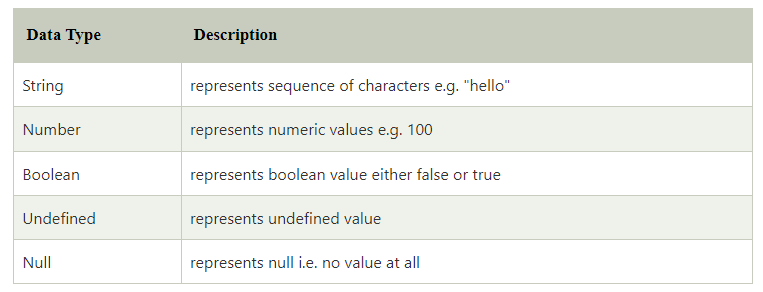
JavaScript primitive data types
There are five types of primitive data types in JavaScript. They are as follows:
JavaScript non-primitive data types
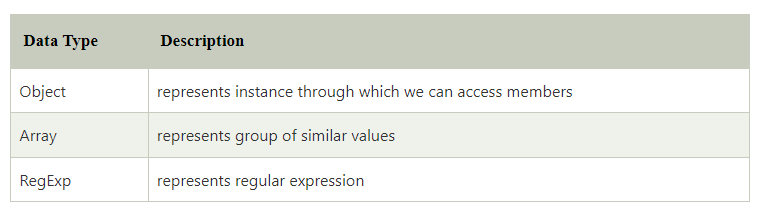
The non-primitive data types are as follows:
JavaScript Operators
JavaScript operators are symbols that are used to perform operations on operands. For example:
Here, + is the arithmetic operator and = is the assignment operator.
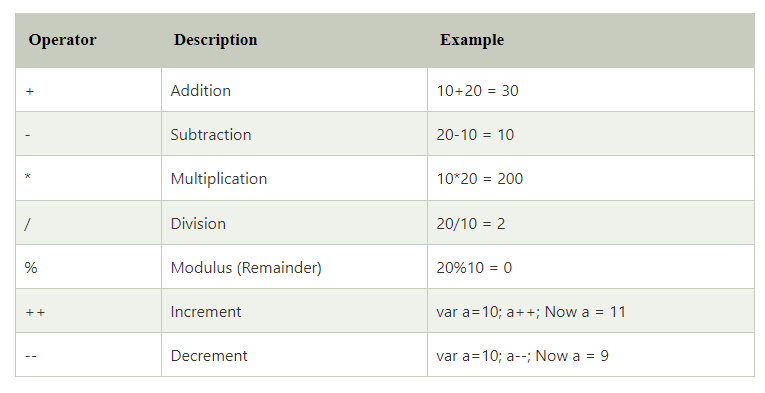
There are following types of operators in JavaScript.
1. Arithmetic Operators
2. Comparison (Relational) Operators
3. Bitwise Operators
4. Logical Operators
5. Assignment Operators
6. Special Operators
JavaScript Comparison Operators
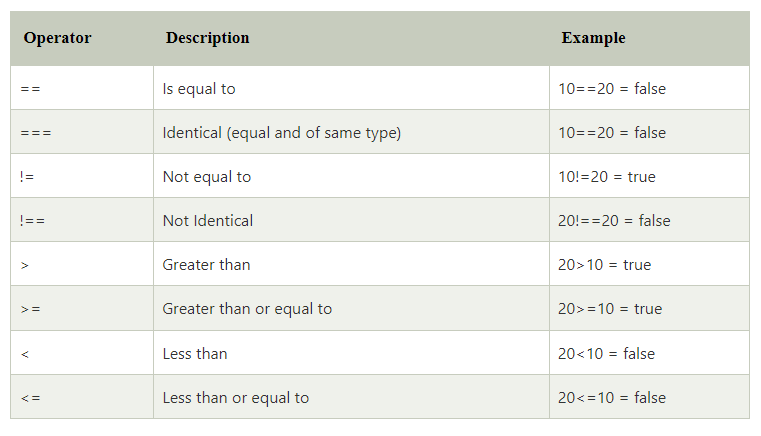
The JavaScript comparison operator compares the two operands. The comparison operators are as follows:
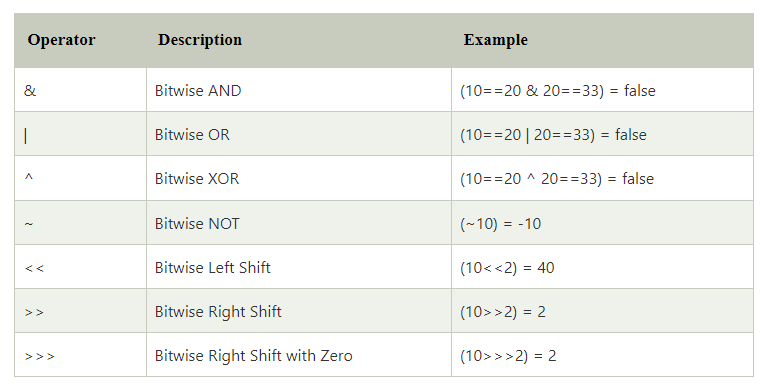
JavaScript Bitwise Operators
The bitwise operators perform bitwise operations on operands. The bitwise operators are as follows:
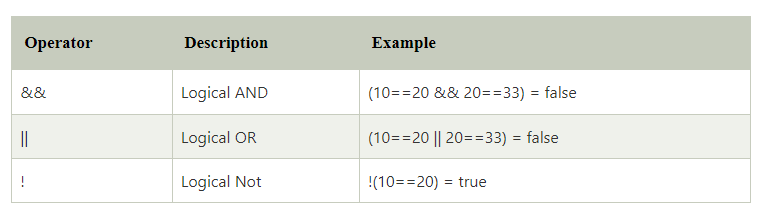
JavaScript Logical Operators
The following operators are known as JavaScript logical operators.
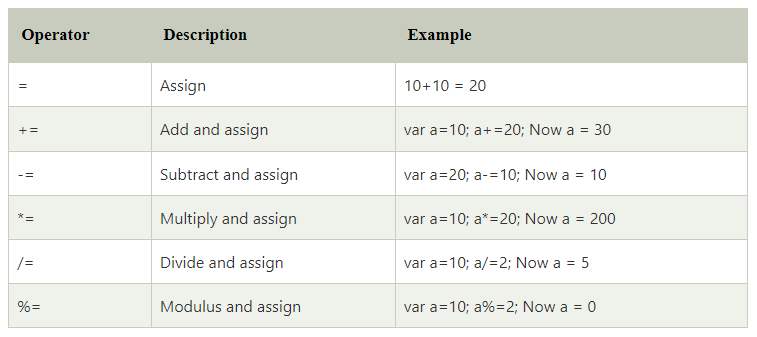
JavaScript Assignment Operators
The following operators are known as JavaScript assignment operators.
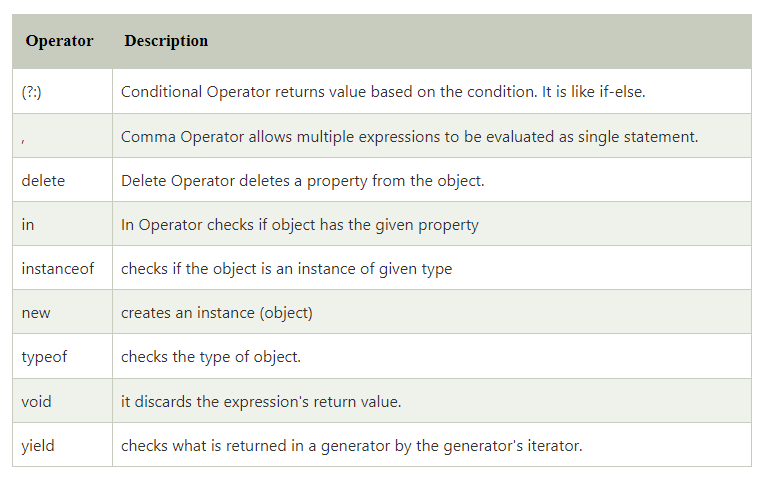
JavaScript Special Operators
The following operators are known as JavaScript special operators.
Leave a Reply